# Simple Web Server in JDK 18

<!-- wp:paragraph -->
<p>JDK 18 is shipped with Simple Web Server for ad hoc testing, prototyping, and also you can learn performance testing by running it local. In this blog post, we are going to see how you can use Simple Web Server in JDK 18.</p>
<!-- /wp:paragraph -->

<!-- wp:heading -->
<h2>Prerequisites</h2>
<!-- /wp:heading -->

<!-- wp:paragraph -->
<p>The only prerequisite is to install OpenJDK 18 on your system. You can install it by downloading the binaries from here, https://openjdk.java.net/projects/jdk/18/.</p>
<!-- /wp:paragraph -->

<!-- wp:paragraph -->
<p>After setting the environment variable, you can verify the installation using <code>java -version</code> command.</p>
<!-- /wp:paragraph -->

<!-- wp:image {"align":"center","id":9158,"sizeSlug":"full","linkDestination":"media"} -->
<div class="wp-block-image"><figure class="aligncenter size-full"><a href="https://qainsights.com/wp-content/uploads/2022/03/image.png"><img src="https://qainsights.com/wp-content/uploads/2022/03/image.png" alt="JDK 18" class="wp-image-9158"/></a><figcaption>JDK 18</figcaption></figure></div>
<!-- /wp:image -->

<!-- wp:paragraph -->
<p>By default, JDK 18 shipped with Simple Web Server. Go to the path where you extracted and mapped the environment variable. e.g. on Windows, I have placed the JDK in <code>C:\java\jdk-18</code>.</p>
<!-- /wp:paragraph -->

<!-- wp:paragraph -->
<p>Go to <code>JAVA_HOME\bin</code>, there will be an executable called <code>jwebserver.exe</code>.</p>
<!-- /wp:paragraph -->

<!-- wp:heading -->
<h2>Launching Simple Web Server</h2>
<!-- /wp:heading -->

<!-- wp:paragraph -->
<p>Launching Simple Web Server is easy and straight forward. Open your favorite terminal, and enter <code>jwebserver</code>.</p>
<!-- /wp:paragraph -->

<!-- wp:paragraph -->
<p>By default, it will launch the web server at http://127.0.0.1:8000 by default.</p>
<!-- /wp:paragraph -->

<!-- wp:heading -->
<h2>What is a Simple Web Server?</h2>
<!-- /wp:heading -->

<!-- wp:paragraph -->
<p>Simple Web Server is a minimal HTTP web server which serves the current directory hierarchy.  It is based on the <code>com.sun.net.httpserver</code> implementation. The package has been improved and is now available via command line for developers and testers.</p>
<!-- /wp:paragraph -->

<!-- wp:heading -->
<h2>Verify the Simple Web Server</h2>
<!-- /wp:heading -->

<!-- wp:paragraph -->
<p>To verify the Simple Web Server, just enter <code>jwebserver -version</code> which will print the current version.</p>
<!-- /wp:paragraph -->

<!-- wp:heading -->
<h2>Simple Web Server Commands</h2>
<!-- /wp:heading -->

<!-- wp:paragraph -->
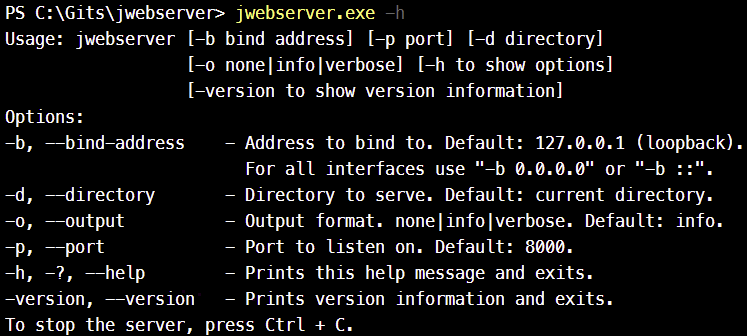
<p>To get help, enter <code>jwebserver -h</code></p>
<!-- /wp:paragraph -->

<!-- wp:image {"align":"center","id":9161,"sizeSlug":"full","linkDestination":"media"} -->
<div class="wp-block-image"><figure class="aligncenter size-full"><a href="https://qainsights.com/wp-content/uploads/2022/03/image-1.png"><img src="https://qainsights.com/wp-content/uploads/2022/03/image-1.png" alt="jwebserver -h" class="wp-image-9161"/></a><figcaption>jwebserver -h</figcaption></figure></div>
<!-- /wp:image -->

<!-- wp:paragraph -->
<p>To bind the server to all the interfaces, enter <code>jwebserver -b 0.0.0.0</code></p>
<!-- /wp:paragraph -->

<!-- wp:paragraph -->
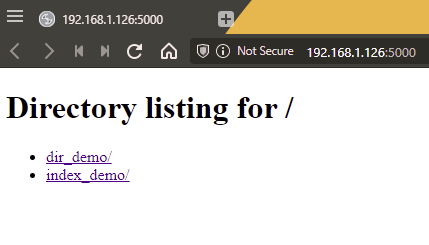
<p>To allocate a port, enter <code>jwebserver -p 5000</code></p>
<!-- /wp:paragraph -->

<!-- wp:paragraph -->
<p>To change the log output, enter <code>jwebserver -o  none|info|verbose</code></p>
<!-- /wp:paragraph -->

<!-- wp:paragraph -->
<p>To change the directory, enter <code>jwebserver -d &lt;absolute-path</code></p>
<!-- /wp:paragraph -->

<!-- wp:image {"align":"center","id":9162,"sizeSlug":"full","linkDestination":"media"} -->
<div class="wp-block-image"><figure class="aligncenter size-full"><a href="https://qainsights.com/wp-content/uploads/2022/03/image-2.png"><img src="https://qainsights.com/wp-content/uploads/2022/03/image-2.png" alt="Simple Web Server in JDK 18" class="wp-image-9162"/></a><figcaption>Simple Web Server in JDK 18</figcaption></figure></div>
<!-- /wp:image -->

<!-- wp:heading -->
<h2>Limitations</h2>
<!-- /wp:heading -->

<!-- wp:paragraph -->
<p>The following are the limitations of the Simple Web Server:</p>
<!-- /wp:paragraph -->

<!-- wp:list -->
<ul><li>supports only GET and HEAD methods.</li><li>supports HTTP 1.1. No HTTP 2.</li><li>supports only HTTP. No HTTPS.</li></ul>
<!-- /wp:list -->

<!-- wp:heading -->
<h2>Features</h2>
<!-- /wp:heading -->

<!-- wp:paragraph -->
<p>By default, jwebserver serves the current directory in a hierarchy. </p>
<!-- /wp:paragraph -->

<!-- wp:image {"align":"center","id":9164,"sizeSlug":"full","linkDestination":"media"} -->
<div class="wp-block-image"><figure class="aligncenter size-full"><a href="https://qainsights.com/wp-content/uploads/2022/03/image-3.png"><img src="https://qainsights.com/wp-content/uploads/2022/03/image-3.png" alt="directory listing" class="wp-image-9164"/></a><figcaption>directory listing</figcaption></figure></div>
<!-- /wp:image -->

<!-- wp:paragraph -->
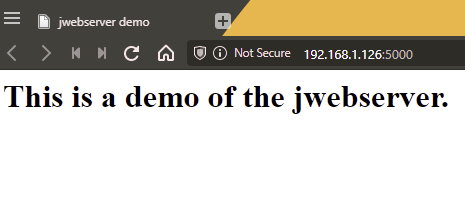
<p>If the directory being served has <code>index.html</code>, then the content will be rendered.</p>
<!-- /wp:paragraph -->

<!-- wp:image {"align":"center","id":9165,"sizeSlug":"full","linkDestination":"media"} -->
<div class="wp-block-image"><figure class="aligncenter size-full"><a href="https://qainsights.com/wp-content/uploads/2022/03/image-4.png"><img src="https://qainsights.com/wp-content/uploads/2022/03/image-4.png" alt="index.html" class="wp-image-9165"/></a><figcaption>index.html</figcaption></figure></div>
<!-- /wp:image -->

<!-- wp:paragraph -->
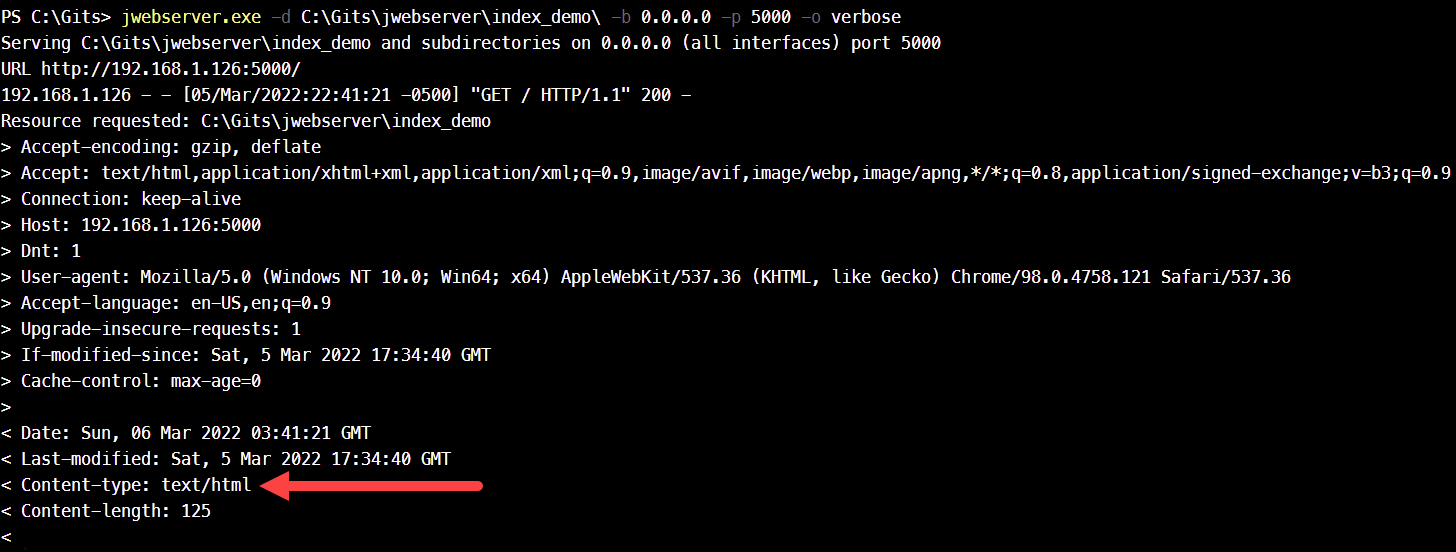
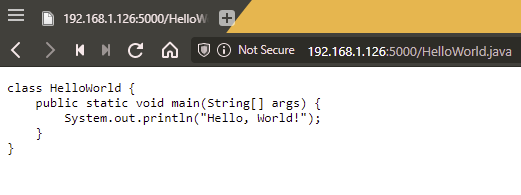
<p>MIME type are automatically configured. *.html files will be served as text/html, *.java files will be served as text file. Other files will be downloaded, if you click on the file name.</p>
<!-- /wp:paragraph -->

<!-- wp:image {"align":"center","id":9166,"sizeSlug":"large","linkDestination":"media"} -->
<div class="wp-block-image"><figure class="aligncenter size-large"><a href="https://qainsights.com/wp-content/uploads/2022/03/image-5.png"><img src="https://qainsights.com/wp-content/uploads/2022/03/image-5-1024x388.png" alt="MIME Type" class="wp-image-9166"/></a><figcaption>HTML MIME Type</figcaption></figure></div>
<!-- /wp:image -->

<!-- wp:image {"align":"center","id":9167,"sizeSlug":"full","linkDestination":"media"} -->
<div class="wp-block-image"><figure class="aligncenter size-full"><a href="https://qainsights.com/wp-content/uploads/2022/03/image-6.png"><img src="https://qainsights.com/wp-content/uploads/2022/03/image-6.png" alt="java MIME type" class="wp-image-9167"/></a><figcaption>java MIME type</figcaption></figure></div>
<!-- /wp:image -->

<!-- wp:paragraph -->
<p>The Simple Web Server keeps running till the session is terminated. To terminate, press CTRL + C.</p>
<!-- /wp:paragraph -->

<!-- wp:heading -->
<h2>Extending the Simple Web Server</h2>
<!-- /wp:heading -->

<!-- wp:paragraph -->
<p>Suppose, if you want to extend and customize the Simple Web Server, you can leverage <code>com.sun.net.httpserver</code> package and the new classes <code>SimpleFileServer</code>,&nbsp;<code>HttpHandlers</code>, and&nbsp;<code>Request</code>.</p>
<!-- /wp:paragraph -->

<!-- wp:heading -->
<h2>Other Options</h2>
<!-- /wp:heading -->

<!-- wp:paragraph -->
<p>The other alternative is to use <code>java -m jdk.httpserver</code>. jwebserver uses <code>java -m jdk.httpserver</code> under the hood. You can also use the below command to launch the Simple Web Server.</p>
<!-- /wp:paragraph -->

<!-- wp:paragraph -->
<p><code>java -m jdk.httpserver -b 0.0.0.0 -p 5000</code></p>
<!-- /wp:paragraph -->

<!-- wp:heading -->
<h2>Final Words</h2>
<!-- /wp:heading -->

<!-- wp:paragraph -->
<p>The Simple Web Server is a minimal HTTP web server which will be helpful for quick and ad hoc testing, prototyping, and for learning performance testing concepts. It will be helpful for developers and QA professionals. But if you prefer something more like a demo app, you can spin up containers; there are a lot of open source apps are available which have more features. </p>
<!-- /wp:paragraph -->